S001
Know the audience, goal and context
RuleBefore drawing, write down who reads it, what they should do afterwards and where they will see it.
Brief & storyCheck: by handSource: OrRon / EpicInfographics
S002
State the insight in the title
RuleTitles state the finding ("81% ends up in landfill"), not just the topic ("Landfill").
Brief & storyCheck: by handSource: aosoficial / agent-infographic-skill
S003
Five-second takeaway
MetA reader should get the main point within five seconds of seeing the graphic.
Brief & storyCheck: by handSource: aosoficial / agent-infographic-skillPages: /
S004
One hero element
FixedEach infographic has one dominant element; everything else supports it.
Brief & storyCheck: by handSource: OrRon / EpicInfographicsPages: /
S005
Pitch 2–3 story angles first
RuleSketch two or three ways to tell the story and pick one before building.
Brief & storyCheck: by handSource: OrRon / EpicInfographics
S006
One chart, one job
RuleEach chart answers one question; split charts that try to answer two.
Brief & storyCheck: by handSource: OrRon / EpicInfographics
S007
Choose the layout family from the data
RuleComparison, flow, layers, overlap or ranking: pick the structure that matches the relation in the data.
Brief & storyCheck: by handSource: aosoficial / agent-infographic-skill
S008
Every visual has a job
FixedA visual must compare, locate or sequence something; remove visuals that only decorate.
Brief & storyCheck: by handSource: aosoficial / agent-infographic-skillPages: /fa
S009
Give every number context
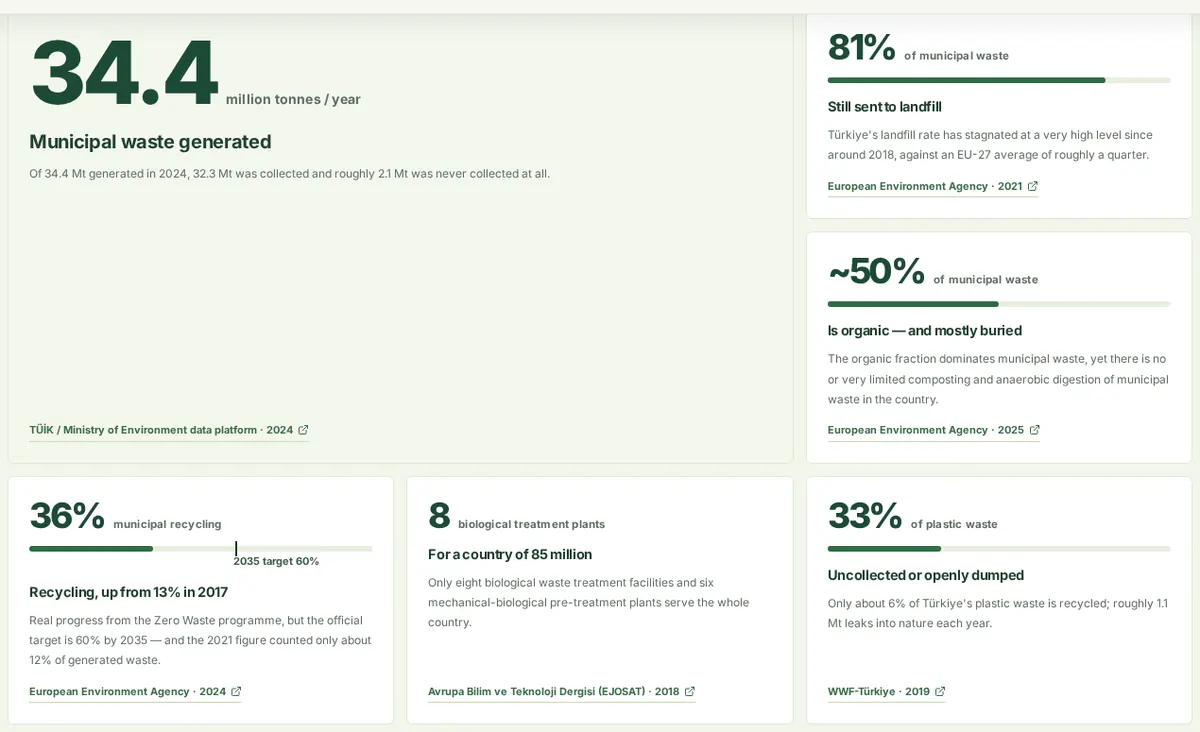
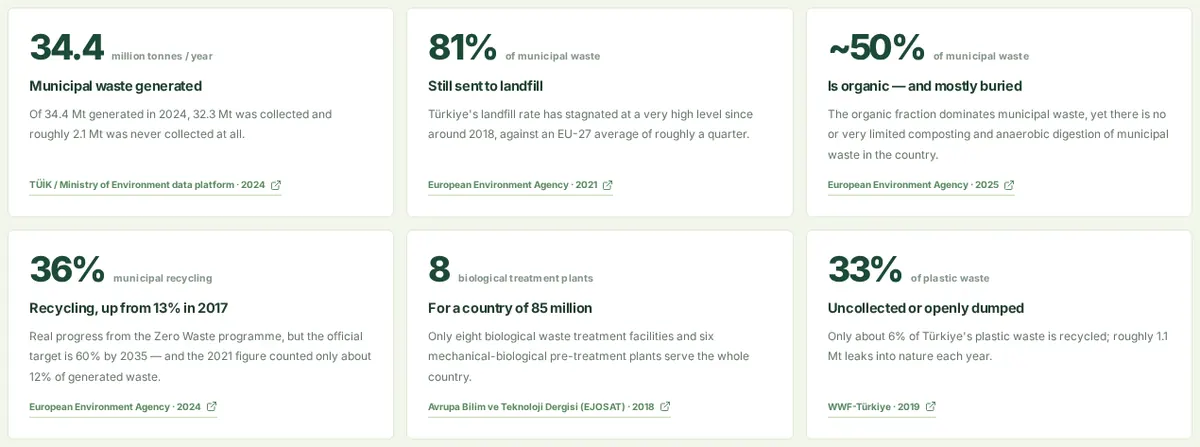
FixedPair a number with a comparison, denominator or target — e.g. 36% recycled against the 60% goal for 2035.
Brief & storyCheck: by handSource: K-Dense-AI / scientific-agent-skills (infographics, scientific-visualization)Pages: /
S010
Specific, not generic
MetUse the real city, year and unit instead of stock icons and generic phrases.
Brief & storyCheck: by handSource: aosoficial / agent-infographic-skillPages: /fa · /maps/istanbul-waste-map
S011
Never invent statistics
MetEvery figure comes from a cited source or is clearly labelled as an estimate.
Data integrityCheck: unsourcedSource: OrRon / EpicInfographicsPages: / · /fa · /insights
S012
Source next to the figure
MetThe source link sits beside the number, not only in a footer.
Data integrityCheck: unsourcedSource: aosoficial / agent-infographic-skillPages: /
S013
Label illustrative values
MetDemo or modelled values carry a visible "estimate" or "demo" tag.
Data integrityCheck: by handSource: OrRon / EpicInfographicsPages: /last-minute · /collect/moto
S014
State the denominator
MetPercentages say "of what": 36% of municipal waste, not just 36%.
Data integrityCheck: by handSource: aosoficial / agent-infographic-skillPages: /
S015
Name the uncertainty
MetUse ranges or "~" when a value is uncertain; never imply false precision.
Data integrityCheck: by handSource: K-Dense-AI / scientific-agent-skills (infographics, scientific-visualization)Pages: /
S016
Round to meaningful precision
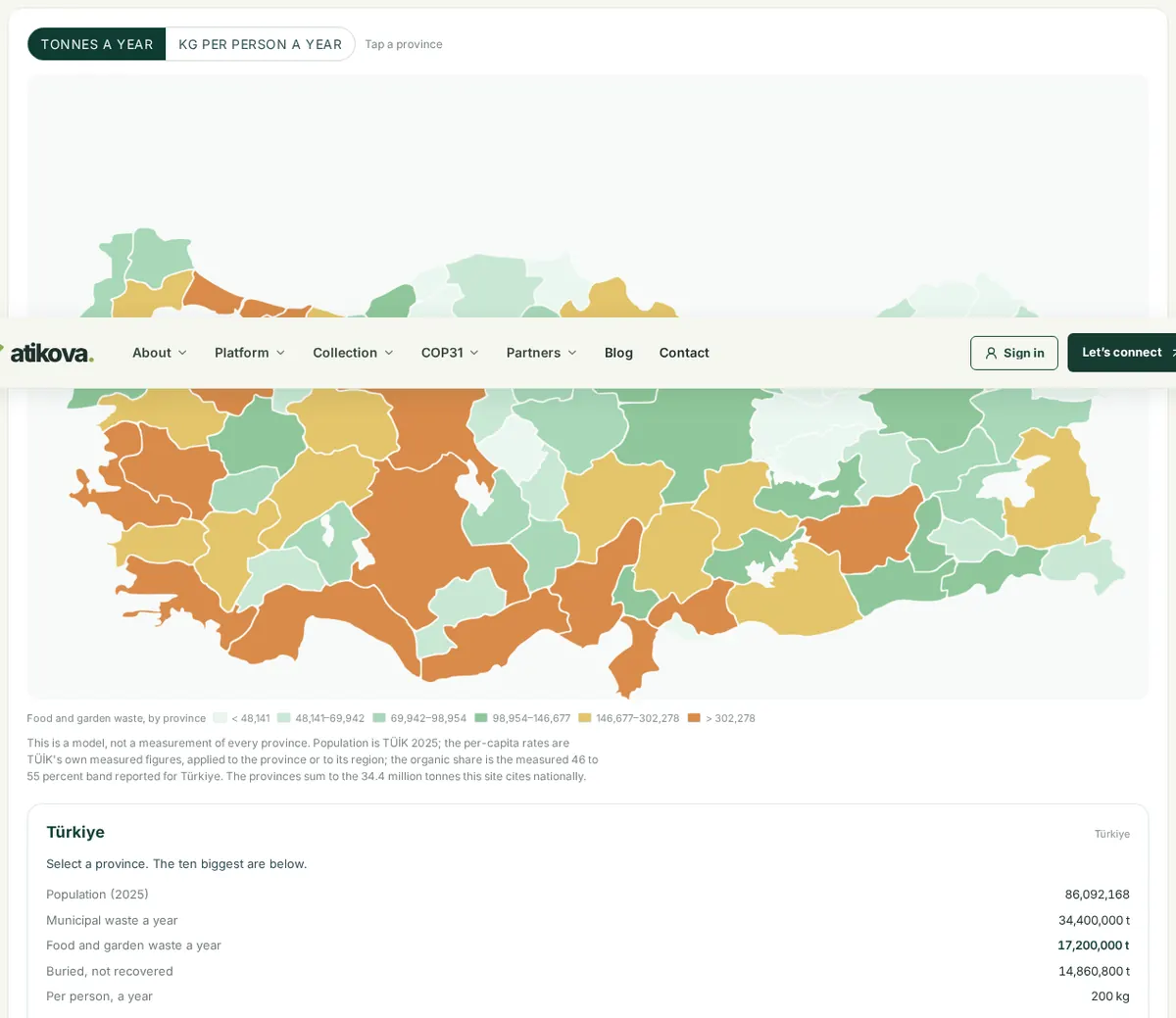
FixedLegend breaks and labels use about two significant figures (48,000, not 48,141).
Data integrityCheck: by handSource: K-Dense-AI / scientific-agent-skills (infographics, scientific-visualization)Pages: /map · /maps/istanbul-waste-map
S017
Tell missing apart from zero
RuleAreas with no data get a distinct neutral fill and say so in the legend.
Data integrityCheck: by handSource: K-Dense-AI / scientific-agent-skills (infographics, scientific-visualization)
S018
State the normalisation
MetSay whether a map shows totals or per-capita values, on the toggle or the legend.
Data integrityCheck: by handSource: K-Dense-AI / scientific-agent-skills (infographics, scientific-visualization)Pages: /map
S019
Keep provenance
MetStore publisher, year and link for each number in the data file, not in the layout.
Data integrityCheck: by handSource: K-Dense-AI / scientific-agent-skills (infographics, scientific-visualization)Pages: /insights
S020
Same model, same number
FixedA figure shown on two pages comes from the same data module.
Data integrityCheck: by handSource: aosoficial / agent-infographic-skillPages: /fa · /map
S021
No trust theatre
MetNo fake partner logos, testimonials or badges; only real partners are shown.
Data integrityCheck: by handSource: ConardLi / garden-skills (web-design-engineer)Pages: /partners · /sponsors
S022
Date the data
MetShow the year of each statistic.
Data integrityCheck: by handSource: K-Dense-AI / scientific-agent-skills (infographics, scientific-visualization)Pages: /
S023
Consistent units
MetUse one unit per comparison (tonnes a year across a whole chart).
Data integrityCheck: by handSource: K-Dense-AI / scientific-agent-skills (infographics, scientific-visualization)Pages: /map
S024
Units on axes and prices
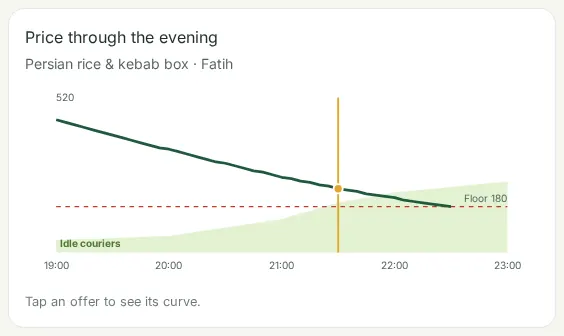
FixedEvery axis and price label carries its unit (TL, tonnes/day).
Data integrityCheck: by handSource: K-Dense-AI / scientific-agent-skills (infographics, scientific-visualization)Pages: /last-minute
S025
Pick the chart from the question
RuleCompare → bars; change over time → line; part of a whole → stacked bar; place → map.
Chart choiceCheck: by handSource: K-Dense-AI / scientific-agent-skills (infographics, scientific-visualization)
S026
Sorted bars for rankings
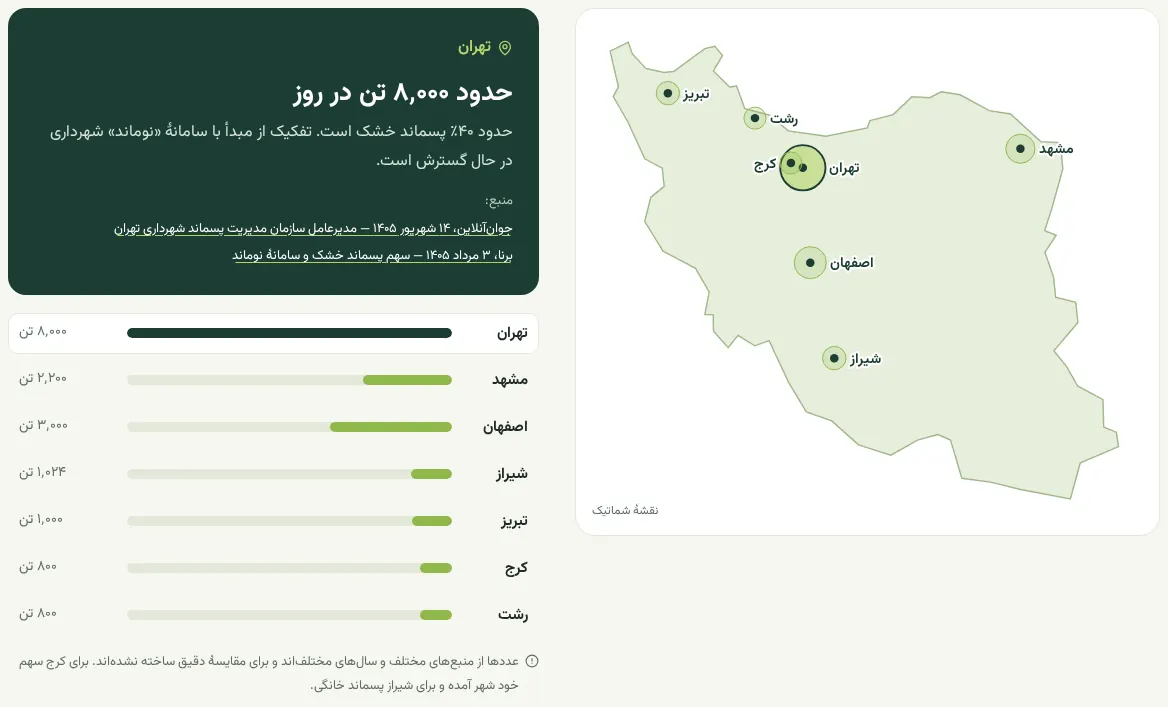
FixedRanked lists are sorted largest first.
Chart choiceCheck: by handSource: OrRon / EpicInfographicsPages: ir.atikova.com
S027
Big numbers: four at most
MetUse big-number callouts for no more than four headline figures per view.
Chart choiceCheck: by handSource: OrRon / EpicInfographicsPages: /fa
S028
A meter for every share
FixedA percentage gets a 0–100 track so its size is seen, not only read.
Chart choiceCheck: by handSource: OrRon / EpicInfographicsPages: /
S029
Mark the target on the meter
FixedWhen a goal exists, mark it on the same scale as the value.
Chart choiceCheck: by handSource: OrRon / EpicInfographicsPages: /
S030
Donuts: five segments or fewer
MetDonuts and pies stop at five slices; beyond that use bars.
Chart choiceCheck: by handSource: OrRon / EpicInfographicsPages: /admin
S031
No two-slice pies
MetTwo values read better as one number or a single meter.
Chart choiceCheck: by handSource: OrRon / EpicInfographics
S032
No radar charts
MetRadar charts distort area; use bars or small multiples.
Chart choiceCheck: by handSource: OrRon / EpicInfographics
S033
No 3D charts
Met3D perspective changes how big values look.
Chart choiceCheck: by handSource: OrRon / EpicInfographics
S034
No gauges
MetGauges waste space and are hard to compare; use a meter bar.
Chart choiceCheck: by handSource: OrRon / EpicInfographics
S035
Lines: about 2px, labelled at the end
MetLines are thin and named at their end rather than in a legend.
Chart choiceCheck: by handSource: OrRon / EpicInfographicsPages: /last-minute
S036
Area fill at 10–15%
MetArea under a line is a light tint that never hides the data.
Chart choiceCheck: by handSource: OrRon / EpicInfographicsPages: /last-minute
S037
Sparklines beside the number
RuleTiny trend lines sit next to the number they explain.
Chart choiceCheck: by handSource: OrRon / EpicInfographics
S038
Step flows of 3–6 steps
MetProcesses show three to six numbered steps; longer ones get grouped.
Chart choiceCheck: by handSource: OrRon / EpicInfographicsPages: /fa
S039
Choropleths for regional values
MetShade regions by a value with a stepped legend.
Chart choiceCheck: by handSource: K-Dense-AI / scientific-agent-skills (infographics, scientific-visualization)Pages: /map · /maps/istanbul-waste-map
S040
Comparisons on one scale
MetBefore/after and A/B views share one scale and one frame.
Chart choiceCheck: by handSource: aosoficial / agent-infographic-skillPages: /design-skills
S041
Bar length equals the value
FixedBars start at zero and their length is proportional to the value.
Truthful geometryCheck: by handSource: OrRon / EpicInfographicsPages: /fa
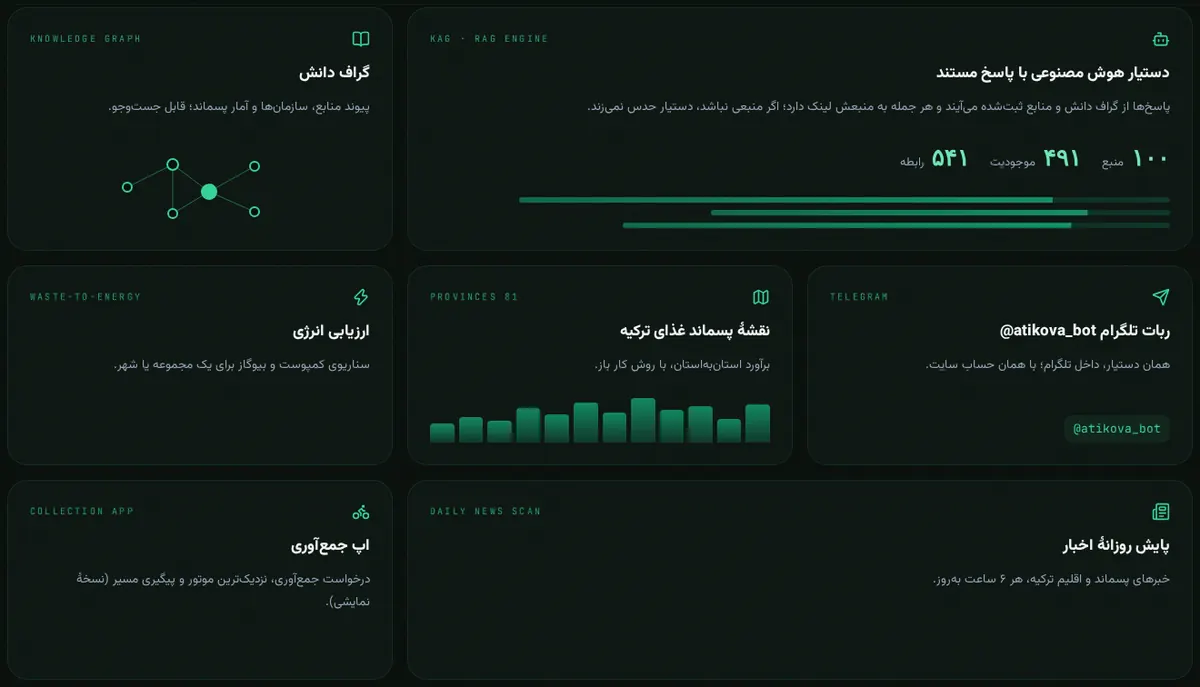
S042
Area ∝ value: radius ∝ √value
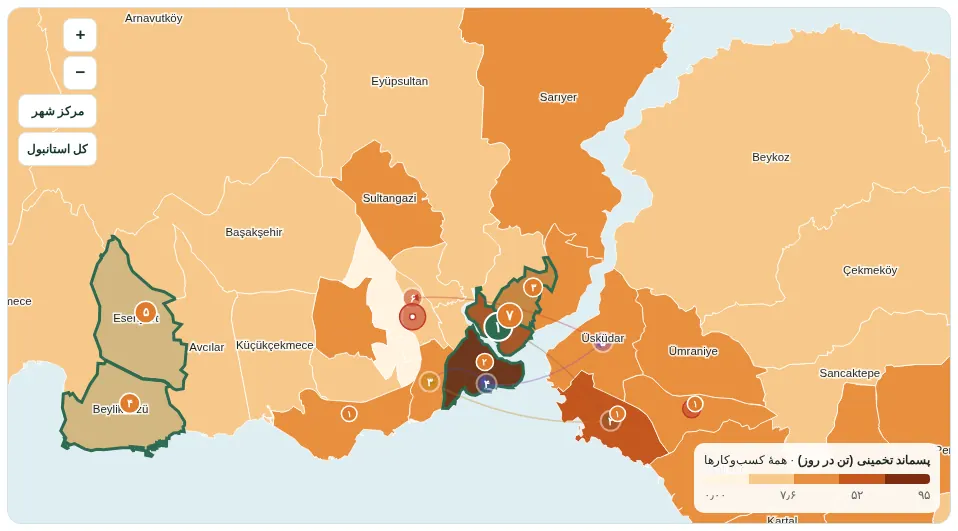
FixedBubble area encodes the value; no constant offset is added to the radius.
Truthful geometryCheck: by handSource: OrRon / EpicInfographicsPages: ir.atikova.com
S043
Mini charts from real data
FixedDecorative fake bars are replaced by real values (here: food waste of the 12 largest provinces).
Truthful geometryCheck: by handSource: OrRon / EpicInfographicsPages: /fa
S044
Bars start at zero
MetNever cut off the bottom of a bar axis.
Truthful geometryCheck: by handSource: K-Dense-AI / scientific-agent-skills (infographics, scientific-visualization)
S045
No dual axes
MetTwo y-axes suggest false correlations; use two charts.
Truthful geometryCheck: by handSource: OrRon / EpicInfographics
S046
Small multiples share a scale
MetRepeated mini charts use the same axis range.
Truthful geometryCheck: by handSource: OrRon / EpicInfographics
S047
Round tick values
MetAxis ticks fall on round numbers.
Truthful geometryCheck: by handSource: OrRon / EpicInfographicsPages: /last-minute
S048
One-way data, one-hue ramp
FixedData that only grows uses one hue from light to dark; diverging colours only around a meaningful midpoint.
Truthful geometryCheck: by handSource: K-Dense-AI / scientific-agent-skills (infographics, scientific-visualization)Pages: / · /map · /policy
S049
Legend numbers on their boundaries
FixedEach legend number sits exactly where its colour step starts.
Truthful geometryCheck: by handSource: OrRon / EpicInfographicsPages: /maps/istanbul-waste-map
S050
Quantile or log steps for skewed data
MetWhen a few values dominate, use quantile or log steps and say so.
Truthful geometryCheck: by handSource: K-Dense-AI / scientific-agent-skills (infographics, scientific-visualization)Pages: /map
S051
Time axes evenly spaced
MetSpace a time axis by time, not by the number of data points.
Truthful geometryCheck: by handSource: K-Dense-AI / scientific-agent-skills (infographics, scientific-visualization)Pages: /last-minute
S052
Honest aspect ratio
MetNever stretch a map or chart to fill a box.
Truthful geometryCheck: by handSource: K-Dense-AI / scientific-agent-skills (infographics, scientific-visualization)
S053
Direct labels over legends
MetPut names next to the marks they describe.
Labels & notesCheck: by handSource: OrRon / EpicInfographicsPages: /admin
S054
Label what the reader needs
FixedAxes, units, sources and the highlighted value are all labelled.
Labels & notesCheck: by handSource: K-Dense-AI / scientific-agent-skills (infographics, scientific-visualization)Pages: /last-minute
S055
Text in ink, not series colour
FixedLabels and numbers use the ink colour; colour belongs to the marks.
Labels & notesCheck: by handSource: OrRon / EpicInfographicsPages: /admin
S056
Inside a bar only if it fits
MetOtherwise place the label at the end of the bar.
Labels & notesCheck: by handSource: OrRon / EpicInfographics
S057
Nothing only in a tooltip
MetKey values are visible without hovering.
Labels & notesCheck: by handSource: OrRon / EpicInfographicsPages: /map
S058
Compact numbers, one decimal for %
MetWrite 1.2M rather than 1,203,441; keep percentages to one decimal.
Labels & notesCheck: by handSource: K-Dense-AI / scientific-agent-skills (infographics, scientific-visualization)
S059
Tabular figures
FixedUse tabular numerals in tables, legends and KPI tiles so columns line up.
Labels & notesCheck: by handSource: K-Dense-AI / scientific-agent-skills (infographics, scientific-visualization)Pages: /map · /admin
S060
Highlight the key value
FixedOne mark is emphasised; the rest stay quiet.
Labels & notesCheck: by handSource: K-Dense-AI / scientific-agent-skills (infographics, scientific-visualization)Pages: /fa
S061
Every chart has a caption
FixedSay what, where, when and the source under the chart.
Labels & notesCheck: by handSource: K-Dense-AI / scientific-agent-skills (infographics, scientific-visualization)Pages: /fa
S062
Name charts for screen readers
FixedSVG charts get role="img" and an aria-label in the page language.
Labels & notesCheck: chartNameSource: K-Dense-AI / scientific-agent-skills (infographics, scientific-visualization)Pages: /fa · /maps/istanbul-waste-map
S063
Kicker above the title
MetA short kicker sets the context above a headline.
Labels & notesCheck: by handSource: op7418 / guizang-ppt-skill (ideas paraphrased)Pages: /fa
S064
No micro-label noise
FixedRemove tiny repeated labels that add nothing.
Labels & notesCheck: by handSource: ConardLi / garden-skills (web-design-engineer)Pages: /fa
S065
Quiet chart frame
MetGridlines and axes are thin and light; the data is darker.
Labels & notesCheck: by handSource: OrRon / EpicInfographicsPages: /last-minute
S066
Text contrast at least 4.5:1
FixedNormal text reaches WCAG AA 4.5:1 against its background.
ColourCheck: contrastSource: K-Dense-AI / scientific-agent-skills (infographics, scientific-visualization)Pages: / · /insights · /knowledge · /blog · /engine · /assessment · /story · /climate-commitment · /restaurants
S067
Large text and graphics 3:1
FixedLarge text, icons and chart marks reach at least 3:1.
ColourCheck: contrastSource: K-Dense-AI / scientific-agent-skills (infographics, scientific-visualization)Pages: / · /map
S068
Never colour alone
MetPair colour with labels, position or pattern.
ColourCheck: by handSource: K-Dense-AI / scientific-agent-skills (infographics, scientific-visualization)Pages: /admin
S069
Colour-blind-safe palettes
FixedPrefer Okabe-Ito, Tol or single-hue ramps; avoid red-green pairs.
ColourCheck: by handSource: K-Dense-AI / scientific-agent-skills (infographics, scientific-visualization)Pages: /map
S070
Ink, paper and one accent
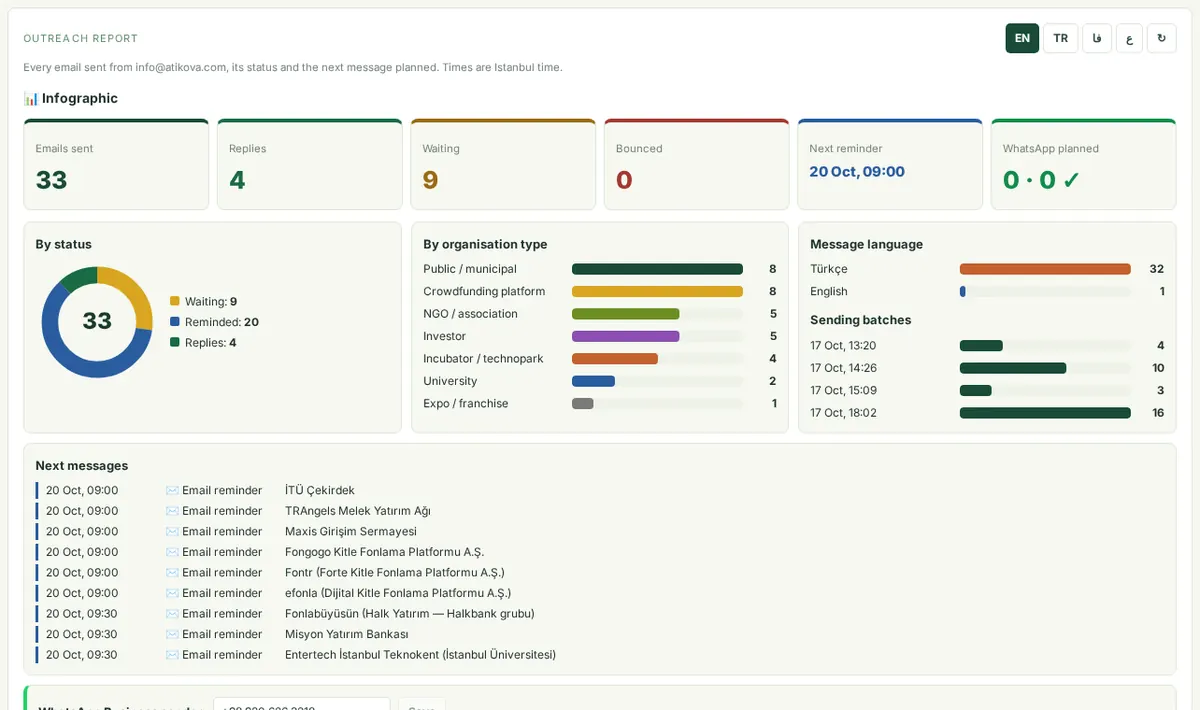
FixedOne accent colour; a second one only for a truly different category.
ColourCheck: by handSource: aosoficial / agent-infographic-skillPages: /admin
S071
60-30-10 balance
MetDominant, secondary and accent colours in roughly that proportion.
ColourCheck: by handSource: K-Dense-AI / scientific-agent-skills (infographics, scientific-visualization)
S072
Palette from the topic
MetChoose colours from the subject — greens and soil tones for food waste and compost.
ColourCheck: by handSource: anthropics / skills (pptx, frontend-design, canvas-design)
S073
Consistent category colours
MetA category keeps the same colour in every chart.
ColourCheck: by handSource: K-Dense-AI / scientific-agent-skills (infographics, scientific-visualization)Pages: /maps/istanbul-waste-map
S074
No purple AI gradient
MetAvoid the default purple-to-blue gradient look.
ColourCheck: by handSource: aosoficial / agent-infographic-skill
S075
No neon
MetNo saturated neon colours on dark backgrounds for content.
ColourCheck: by handSource: ConardLi / garden-skills (web-design-engineer)
S076
Don't fade text with opacity
FixedUse a solid muted colour that passes contrast instead of lowering opacity.
ColourCheck: contrastSource: K-Dense-AI / scientific-agent-skills (infographics, scientific-visualization)Pages: /map
S077
Selection visible on every fill
FixedHover and selected outlines contrast with both the lightest and darkest fills.
ColourCheck: by handSource: OrRon / EpicInfographicsPages: /map
S078
Five hues at most
FixedToo many colours make a view noisy; cap it at about five hues.
ColourCheck: by handSource: ConardLi / garden-skills (web-design-engineer)Pages: /admin
S079
Warning colours only for warnings
FixedRed and amber appear only when something needs attention.
ColourCheck: by handSource: aosoficial / agent-infographic-skillPages: /admin
S080
Text floor of 11px
FixedNo readable text below 11px on screen (303 smaller rules were raised).
TypographyCheck: tinySource: op7418 / guizang-ppt-skill (ideas paraphrased)Pages: / · /dashboard · /marketplace · /assessment · /story · /climate-commitment · /cop31-step-5 · /admin
S081
A clear type scale
RuleSlides: title 36–44pt, header 20–24, body 14–16, captions 10–12.
TypographyCheck: by handSource: anthropics / skills (pptx, frontend-design, canvas-design)
S082
Largest up to 8× the body
MetA hero number can be up to about eight times the body size.
TypographyCheck: by handSource: OrRon / EpicInfographicsPages: /fa
S083
At least three sizes
MetUse three or more distinct sizes to build hierarchy.
TypographyCheck: by handSource: OrRon / EpicInfographics
S084
One family, two weights
RuleInfographics use one sans family with at most two weights.
TypographyCheck: by handSource: aosoficial / agent-infographic-skill
S085
Small text weight ≥ 400
MetNever use thin weights at small sizes.
TypographyCheck: by handSource: op7418 / guizang-ppt-skill (ideas paraphrased)
S086
Fluid sizes with clamp()
MetHeadline sizes scale with the viewport inside a clamp().
TypographyCheck: by handSource: op7418 / guizang-ppt-skill (ideas paraphrased)Pages: /fa
S087
Start-aligned body text
MetLong text is aligned to the start, not centred.
TypographyCheck: by handSource: K-Dense-AI / scientific-agent-skills (infographics, scientific-visualization)
S088
Avoid generic display type
MetChoose display type with character instead of the default.
TypographyCheck: by handSource: ConardLi / garden-skills (web-design-engineer)
S089
Strong type hierarchy
MetHeadings, labels and body text differ clearly in size or weight.
TypographyCheck: by handSource: ConardLi / garden-skills (web-design-engineer)
S090
Two or three fonts at most
MetLimit the number of font families on a page.
TypographyCheck: by handSource: K-Dense-AI / scientific-agent-skills (infographics, scientific-visualization)
S091
Persian text in a Persian face
FixedLatin display fonts are not applied to Persian words.
TypographyCheck: by handSource: Atikova house rule (from the audit of this site)Pages: /fa
S092
Readable line length
MetKeep body lines around 45–80 characters.
TypographyCheck: by handSource: anthropics / skills (pptx, frontend-design, canvas-design)
S093
Units small but readable
FixedUnit labels beside big numbers stay at 11.5px or more.
TypographyCheck: tinySource: OrRon / EpicInfographicsPages: /
S094
Hierarchy by size, colour and position
MetLead the eye with size, contrast, position and whitespace.
Layout & hierarchyCheck: by handSource: K-Dense-AI / scientific-agent-skills (infographics, scientific-visualization)
S095
F and Z reading paths
MetPut key items where the eye lands first — mirrored on right-to-left pages.
Layout & hierarchyCheck: by handSource: K-Dense-AI / scientific-agent-skills (infographics, scientific-visualization)Pages: /fa
S096
About 60% visual, 40% text
RuleInfographics lean on visuals; text supports them.
Layout & hierarchyCheck: by handSource: K-Dense-AI / scientific-agent-skills (infographics, scientific-visualization)
S097
One dense zone, one empty zone
RuleContrast density so the eye has somewhere to rest.
Layout & hierarchyCheck: by handSource: OrRon / EpicInfographics
S098
Card grids ≤ ⅓ of the canvas
RuleDon't fill a whole view with equal cards.
Layout & hierarchyCheck: by handSource: OrRon / EpicInfographics
S099
Something crosses a boundary
MetLet one element break the grid for energy.
Layout & hierarchyCheck: by handSource: OrRon / EpicInfographicsPages: /
S100
Light and dark bands
MetAlternate light and dark sections instead of one flat background.
Layout & hierarchyCheck: by handSource: OrRon / EpicInfographicsPages: / · /fa
S101
Consistent spacing
MetOne spacing scale; equal gaps between equal things.
Layout & hierarchyCheck: by handSource: ConardLi / garden-skills (web-design-engineer)
S102
Enough whitespace
MetCrowding hides hierarchy; give content room.
Layout & hierarchyCheck: by handSource: ConardLi / garden-skills (web-design-engineer)
S103
Align to a grid
MetFix stray offsets; edges line up.
Layout & hierarchyCheck: by handSource: ConardLi / garden-skills (web-design-engineer)
S104
Density matches the purpose
MetDashboards can be dense; story pages are airy.
Layout & hierarchyCheck: by handSource: ConardLi / garden-skills (web-design-engineer)Pages: /dashboard · /story
S105
Bento grids need rhythm and content
FixedVary tile sizes on purpose; every tile carries real content.
Layout & hierarchyCheck: by handSource: ConardLi / garden-skills (web-design-engineer)Pages: /fa
S106
No horizontal overflow on mobile
RuleNothing is wider than the screen at 390px (one page, /blog, still overflows by 6px).
Layout & hierarchyCheck: overflowSource: aosoficial / agent-infographic-skill
S107
Thumbnail test at 240px
RuleShrink to 240px wide: the main message must survive.
Layout & hierarchyCheck: by handSource: aosoficial / agent-infographic-skill
S108
Content visible without animation
FixedReveal effects fall back to visible: after a timeout, when printing and without JavaScript.
AccessibilityCheck: hiddenSource: ConardLi / garden-skills (web-design-engineer)Pages: /fa
S109
A reduced-motion path
RuleRespect prefers-reduced-motion for every animation.
AccessibilityCheck: by handSource: ConardLi / garden-skills (web-design-engineer)
S110
Hide decoration from screen readers
FixedPurely visual meters and decorative SVG get aria-hidden; the number is read instead.
AccessibilityCheck: by handSource: K-Dense-AI / scientific-agent-skills (infographics, scientific-visualization)Pages: /
S111
lang and dir match the page
FixedThe html lang and dir attributes match the language of the content.
AccessibilityCheck: wrongLangSource: W3C WCAG 2.2 (cited by the skills above)Pages: /fa · ir.atikova.com
S112
Visible focus
RuleKeyboard focus is clearly visible on every control.
AccessibilityCheck: by handSource: W3C WCAG 2.2 (cited by the skills above)
S113
Touch targets ≥ 24px
RuleButtons and clickable shapes have usable hit areas.
AccessibilityCheck: by handSource: W3C WCAG 2.2 (cited by the skills above)
S114
Alt text for images
MetInformative images have alt text; decorative ones have an empty alt.
AccessibilityCheck: by handSource: W3C WCAG 2.2 (cited by the skills above)
S115
Headings in order
MetUse h1 → h2 → h3 without skipping levels.
AccessibilityCheck: by handSource: W3C WCAG 2.2 (cited by the skills above)
S116
Tables have header cells
MetData tables use th cells for their headers.
AccessibilityCheck: by handSource: W3C WCAG 2.2 (cited by the skills above)Pages: /admin
S117
Don't depend on hover
MetEverything works by touch and keyboard too.
AccessibilityCheck: by handSource: W3C WCAG 2.2 (cited by the skills above)Pages: /map
S118
Readable when printed
FixedHidden-until-scrolled content is shown when the page is printed.
AccessibilityCheck: hiddenSource: Atikova house rule (from the audit of this site)Pages: /fa
S119
Status in words and colour
MetStatus pills say the status in words, not only by colour.
AccessibilityCheck: by handSource: K-Dense-AI / scientific-agent-skills (infographics, scientific-visualization)Pages: /admin
S120
Name interactive maps
FixedInteractive maps get an accessible name in the current language.
AccessibilityCheck: chartNameSource: W3C WCAG 2.2 (cited by the skills above)Pages: /maps/istanbul-waste-map
S121
Errors explained in words
MetError messages say what went wrong, in the user's language.
AccessibilityCheck: by handSource: W3C WCAG 2.2 (cited by the skills above)
S122
No wrong-language text
FixedEach language version shows only that language (names and acronyms like COP31 excepted).
Languages & RTLCheck: wrongLangSource: Atikova house rule (from the audit of this site)Pages: /fa
S123
Isolate mixed-direction text
FixedWrap embedded opposite-direction runs in <bdi>.
Languages & RTLCheck: by handSource: W3C WCAG 2.2 (cited by the skills above)Pages: /fa
S124
Logical properties mirror layouts
FixedUse inline-start/end instead of left/right so layouts flip in RTL.
Languages & RTLCheck: by handSource: W3C WCAG 2.2 (cited by the skills above)Pages: /
S125
Number axes stay left-to-right
MetTime and number axes keep LTR order on RTL pages; their labels are translated.
Languages & RTLCheck: by handSource: Atikova house rule (from the audit of this site)Pages: /last-minute
S126
Persian digits on Persian pages
FixedUse ۰–۹, ٫ and ٪ inside Persian text.
Languages & RTLCheck: by handSource: Atikova house rule (from the audit of this site)Pages: /fa
S127
Localised currency
FixedTL in English and Turkish, لیر in Persian.
Languages & RTLCheck: by handSource: Atikova house rule (from the audit of this site)Pages: /last-minute
S128
Place names in the page's script
FixedUse the common local form of a place name where one exists (استانبول, not İstanbul).
Languages & RTLCheck: by handSource: Atikova house rule (from the audit of this site)Pages: /fa
S129
Same geometry in every language
MetTranslating labels never changes a chart's scale.
Languages & RTLCheck: by handSource: Atikova house rule (from the audit of this site)
S130
Room for longer translations
RuleLeave about 30% spare width; Turkish and Persian labels often run longer.
Languages & RTLCheck: by handSource: Atikova house rule (from the audit of this site)
S131
Locale number formats
Met1,234.5 in English, 1.234,5 in Turkish, ۱٬۲۳۴٫۵ in Persian.
Languages & RTLCheck: by handSource: Atikova house rule (from the audit of this site)Pages: /maps/istanbul-waste-map
S132
Language set in the first HTML
FixedThe server already sends the right lang/dir, so search engines and the first paint are correct.
Languages & RTLCheck: wrongLangSource: Atikova house rule (from the audit of this site)Pages: /fa · ir.atikova.com
S133
One language per image
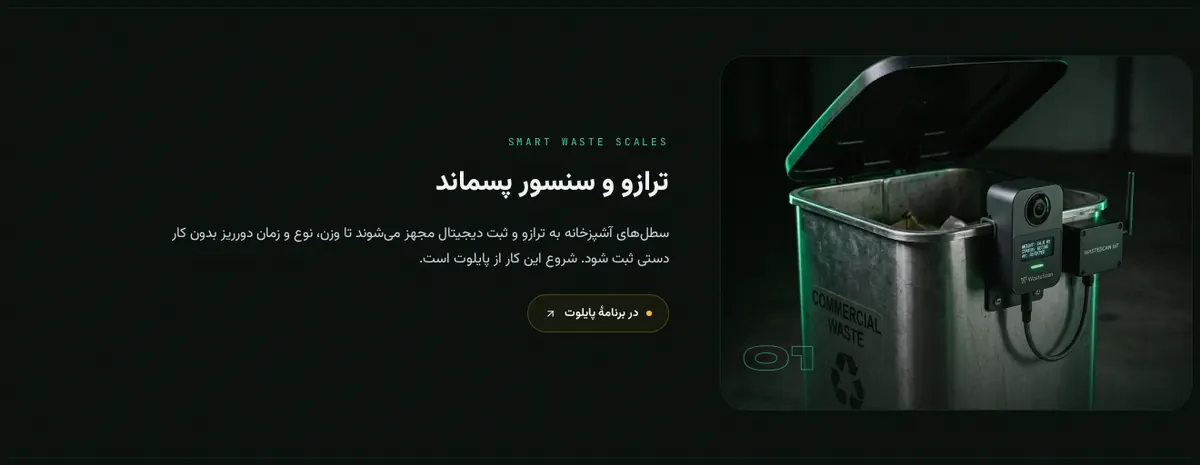
RuleImages that contain text are made separately per language.
Languages & RTLCheck: by handSource: Atikova house rule (from the audit of this site)
S134
Finite CSS builds
FixedAnimations end; data never loops endlessly.
MotionCheck: by handSource: OrRon / EpicInfographicsPages: /fa
S135
Build order: place → structure → data → hero
RuleAnimate the context first and the key number last.
MotionCheck: by handSource: OrRon / EpicInfographics
S136
Equal durations for comparable marks
RuleBars being compared grow at the same speed.
MotionCheck: by handSource: OrRon / EpicInfographics
S137
Count-ups land on the exact value
MetAnimated numbers finish exactly on the real figure.
MotionCheck: by handSource: OrRon / EpicInfographicsPages: /fa
S138
Never animate an axis
MetAxes and scales stay still while data moves.
MotionCheck: by handSource: OrRon / EpicInfographics
S139
Motion for meaning, not spectacle
FixedRemove motion that explains nothing.
MotionCheck: by handSource: ConardLi / garden-skills (web-design-engineer)Pages: /fa
S140
Reveal fallback after 2.5s
FixedScroll reveals show everything if the observer never fires.
MotionCheck: hiddenSource: op7418 / guizang-ppt-skill (ideas paraphrased)Pages: /fa
S141
No shimmer on real data
FixedLoading shimmer is for placeholders, not for actual values.
MotionCheck: by handSource: OrRon / EpicInfographicsPages: /fa
S142
Marquees are decoration only
MetNever put essential information in a scrolling marquee.
MotionCheck: by handSource: ConardLi / garden-skills (web-design-engineer)Pages: /fa
S143
Stop loops for reduced motion
RuleLooping effects pause when the user prefers reduced motion.
MotionCheck: by handSource: ConardLi / garden-skills (web-design-engineer)
S144
One dominant colour (60–70%)
RuleOne colour dominates the deck.
Slides & decksCheck: by handSource: anthropics / skills (pptx, frontend-design, canvas-design)
S145
Dark/light sandwich
RuleDark title and closing slides, light content slides.
Slides & decksCheck: by handSource: anthropics / skills (pptx, frontend-design, canvas-design)
S146
One visual motif
RuleRepeat one shape or treatment through the deck.
Slides & decksCheck: by handSource: anthropics / skills (pptx, frontend-design, canvas-design)
S147
Every slide has a visual
RuleNo text-only slides.
Slides & decksCheck: by handSource: anthropics / skills (pptx, frontend-design, canvas-design)
S148
Stat callouts at 60–72pt
RuleHeadline numbers are set big.
Slides & decksCheck: by handSource: anthropics / skills (pptx, frontend-design, canvas-design)
S149
0.5-inch safe margins
RuleContent stays inside the safe margins.
Slides & decksCheck: by handSource: anthropics / skills (pptx, frontend-design, canvas-design)
S150
No accent lines under titles
MetDecorative underlines look templated.
Slides & decksCheck: by handSource: anthropics / skills (pptx, frontend-design, canvas-design)
S151
No decorative stripes
FixedColour stripes that carry no meaning are removed.
Slides & decksCheck: by handSource: anthropics / skills (pptx, frontend-design, canvas-design)Pages: /admin
S152
Pitch order
RuleCover → problem → market → solution → why now → traction → model → go-to-market → team → competition → ask.
Slides & decksCheck: by handSource: SlideSpeak / slide-design-skill
S153
Skip missing data, never fake it
MetLeave a slide out rather than invent traction.
Slides & decksCheck: by handSource: SlideSpeak / slide-design-skillPages: /investors
S154
Giant numbers only for market and traction
RuleDon't inflate every slide with huge numbers.
Slides & decksCheck: by handSource: SlideSpeak / slide-design-skill
S155
Executive summary second
RuleConsulting-style decks give the answer up front.
Slides & decksCheck: by handSource: SlideSpeak / slide-design-skill
S156
Two data slides in a row at most
RuleBreak long runs with a structural slide.
Slides & decksCheck: by handSource: SlideSpeak / slide-design-skill
S157
Three same-theme slides in a row at most
RuleAlternate themes to keep a rhythm.
Slides & decksCheck: by handSource: op7418 / guizang-ppt-skill (ideas paraphrased)
S158
Squint test
RuleBlur the design: its structure should still say something.
Anti-patternsCheck: by handSource: OrRon / EpicInfographics
S159
Template test
RuleIf it could be any company's page, make it more specific.
Anti-patternsCheck: by handSource: OrRon / EpicInfographics
S160
No identical cards on a flat background
RuleAvoid rows of identical cards on one flat colour.
Anti-patternsCheck: by handSource: OrRon / EpicInfographics
S161
No emoji as icons
FixedHeadings and labels use real icons or none.
Anti-patternsCheck: emojiSource: OrRon / EpicInfographicsPages: /dashboard · /maps/istanbul-waste-map · /admin
S162
Avoid headline + three cards
RuleBreak the default hero-plus-three-cards pattern.
Anti-patternsCheck: by handSource: aosoficial / agent-infographic-skill
S163
No glassmorphism
MetFrosted-glass panels hurt contrast.
Anti-patternsCheck: by handSource: aosoficial / agent-infographic-skill
S164
No repeated eyebrow headers
FixedDon't put the same kind of small label over every section.
Anti-patternsCheck: by handSource: ConardLi / garden-skills (web-design-engineer)Pages: /fa
S165
Avoid zigzag monotony
RuleEndless alternating image/text rows get tiring; vary them.
Anti-patternsCheck: by handSource: ConardLi / garden-skills (web-design-engineer)
S166
Avoid the default centred hero
MetA centred headline on a gradient is the generic AI default.
Anti-patternsCheck: by handSource: ConardLi / garden-skills (web-design-engineer)Pages: /
S167
One primary action per view
RuleDon't repeat the same call-to-action button over and over.
Anti-patternsCheck: by handSource: ConardLi / garden-skills (web-design-engineer)
S168
Not everything in a card
RuleAvoid boxing every piece of content.
Anti-patternsCheck: by handSource: ConardLi / garden-skills (web-design-engineer)
S169
No copy-shaped decoration
MetFake text lines and lorem shapes are removed.
Anti-patternsCheck: by handSource: ConardLi / garden-skills (web-design-engineer)
S170
No CSS counterfeit charts
FixedDon't fake charts or screenshots with CSS shapes; draw real data.
Anti-patternsCheck: by handSource: ConardLi / garden-skills (web-design-engineer)Pages: /fa
S171
Content over decoration
FixedOrnaments that compete with the data are cut.
Anti-patternsCheck: by handSource: ConardLi / garden-skills (web-design-engineer)Pages: /admin · /fa
S172
Quality gate: 13 of 16
RuleScore eight criteria from 0 to 2; ship only at 13 or more.
Review & QACheck: by handSource: aosoficial / agent-infographic-skill
S173
Look at your own render
MetCheck the rendered page, not only the code.
Review & QACheck: by handSource: OrRon / EpicInfographics
S174
Before/after screenshots
MetCapture the same views before and after each change.
Review & QACheck: by handSource: anthropics / skills (pptx, frontend-design, canvas-design)Pages: /design-skills
S175
No overlapping text
RulePreflight that no labels sit on top of each other.
Review & QACheck: by handSource: OrRon / EpicInfographics
S176
No clipped text
MetText never runs out of its box.
Review & QACheck: overflowSource: OrRon / EpicInfographics
S177
Measure overflow after rendering
MetCompare scroll width with the viewport at desktop and phone sizes.
Review & QACheck: overflowSource: op7418 / guizang-ppt-skill (ideas paraphrased)
S178
Check the picture and the code
MetAutomatic checks plus a human look.
Review & QACheck: by handSource: op7418 / guizang-ppt-skill (ideas paraphrased)
S179
Red-team the numbers
RuleAsk what a sceptic would challenge in each figure.
Review & QACheck: by handSource: aosoficial / agent-infographic-skill
S180
Mobile legibility
FixedCheck every chart at 390px wide.
Review & QACheck: tinySource: aosoficial / agent-infographic-skill
S181
Originality
RuleScore how far a design is from a stock template.
Review & QACheck: by handSource: aosoficial / agent-infographic-skill
S182
Evidence integrity
MetEvery number can be traced to its source.
Review & QACheck: unsourcedSource: aosoficial / agent-infographic-skill
S183
Topology fit
RuleThe layout matches the relation in the data.
Review & QACheck: by handSource: aosoficial / agent-infographic-skill
S184
Same audit on every page
MetRun one script across all pages at desktop and phone sizes.
Review & QACheck: by handSource: anthropics / skills (pptx, frontend-design, canvas-design)
S185
Fix, then re-measure
MetReport before and after numbers measured the same way.
Review & QACheck: by handSource: anthropics / skills (pptx, frontend-design, canvas-design)Pages: /design-skills
S186
Declarative templates
RuleDescribe an infographic as structure plus items so it can be regenerated.
Review & QACheck: by handSource: antvis / Infographic
S187
Separate structure from item style
RuleKeep the layout (list, sequence, comparison) apart from how each item looks.
Review & QACheck: by handSource: antvis / Infographic
S188
Ten-point critique
MetCheck AI cliché, hierarchy, colour count, spacing, whitespace, fonts, alignment, decoration, neon and density.
Review & QACheck: by handSource: ConardLi / garden-skills (web-design-engineer)
S189
Admin views follow the same rules
FixedInternal dashboards get the same chart rules as public pages.
Review & QACheck: by handSource: aosoficial / agent-infographic-skillPages: /admin
S190
Keep a living catalog
MetTrack each rule, where it applies and whether it passes.
Review & QACheck: by handSource: antvis / InfographicPages: /design-skills · /admin
 BeforeAfter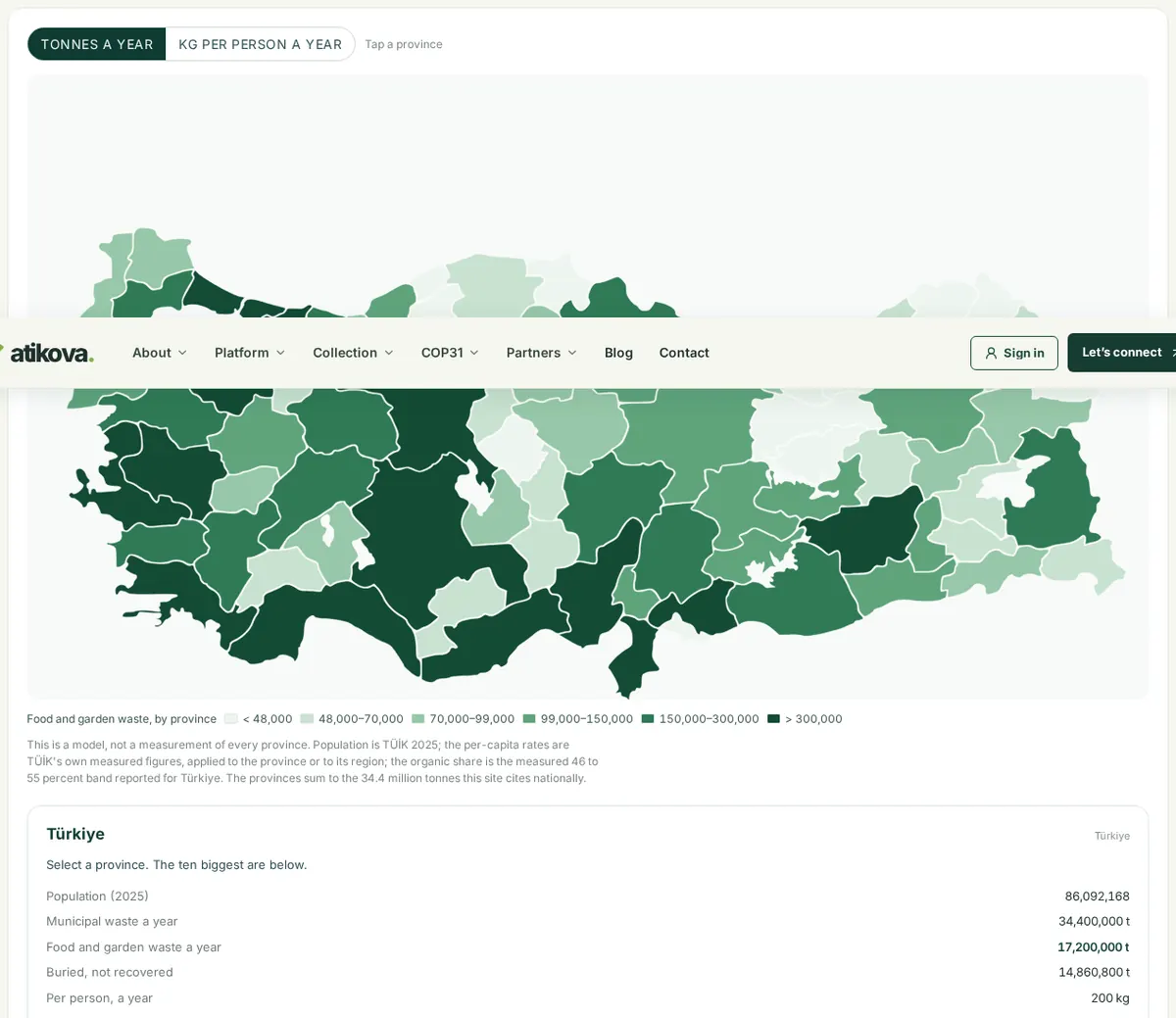
 BeforeAfter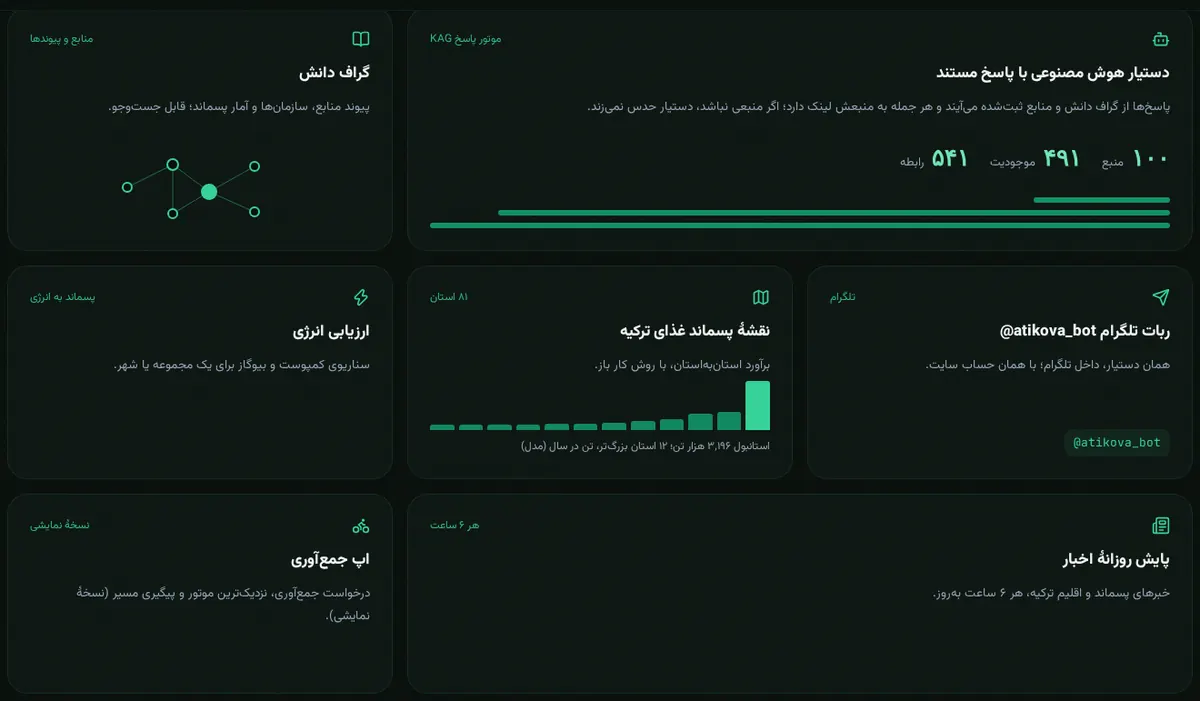
 BeforeAfter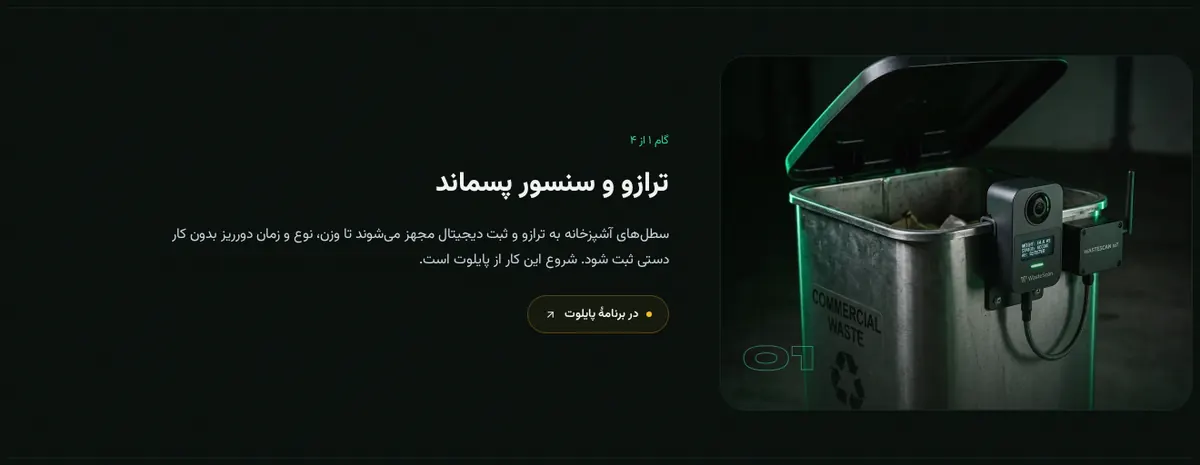
 BeforeAfter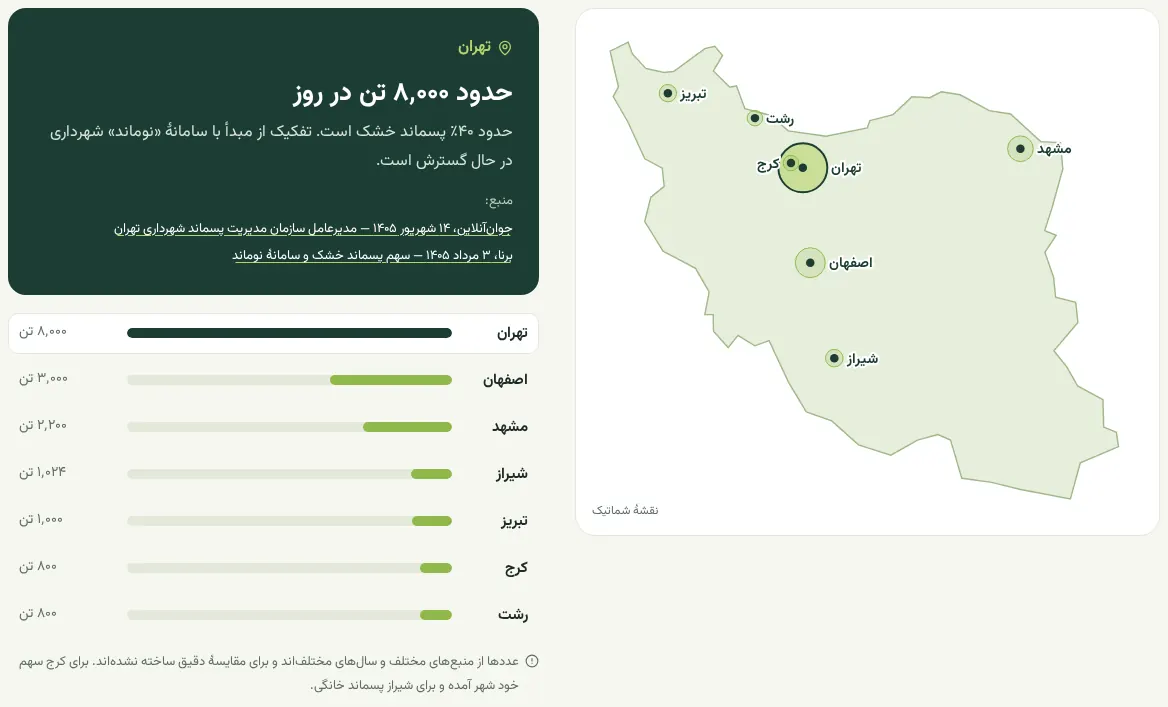
 BeforeAfter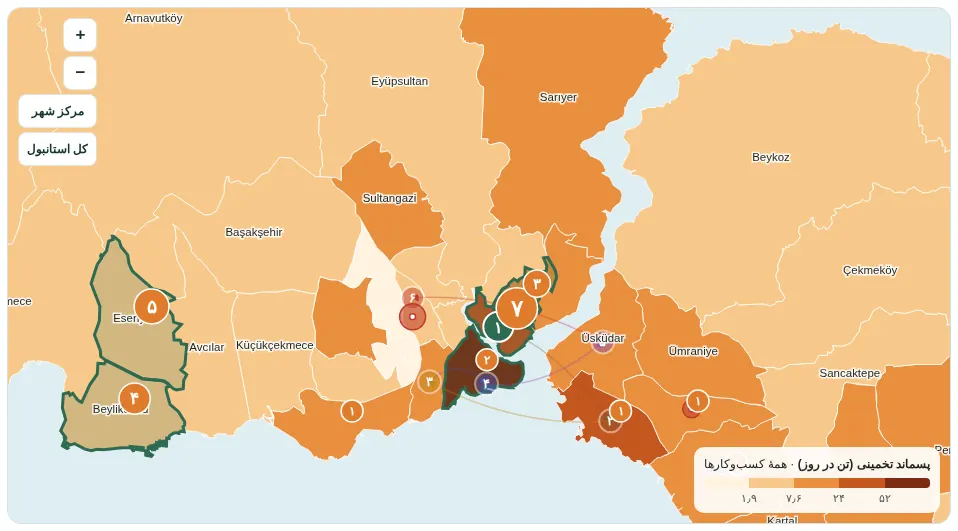
 BeforeAfter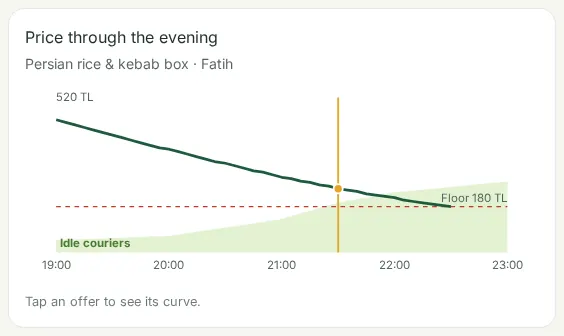
 BeforeAfter
 BeforeAfter
 BeforeAfter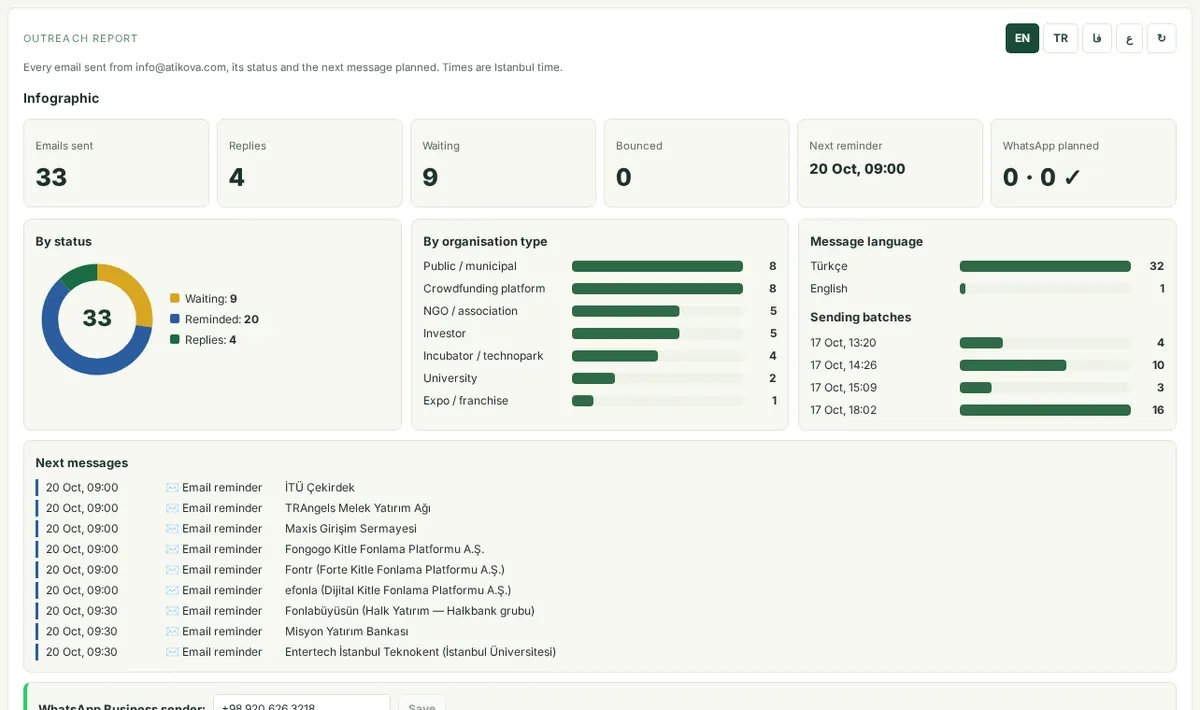
 BeforeAfter